
Online Protractor: Free Digital Protractor for 180° & 360°
This online protractor lets you measure and set angles on your screen. Drag two handles, and the digital protractor shows the angle live in degrees, radians or gradians. It is a simple protractor tool for students, teachers, designers and DIY users who need a quick angle check. Use this protractor online on any phone or computer.
How to Use This Online Protractor
Here is how to use protractor controls on this page, in four steps.
- Drag the handle: Move either handle along the arc and the angle updates live, even with one finger on a phone.
- Type an exact angle: Enter a value in the box and the handle jumps to it.
- Tap a quick angle: Buttons for 30, 45, 60, 90, 120 and 180 degrees set common angles at once.
- Switch the unit or range: Choose degrees, radians or gradians, then pick the 180 or 360 degree view.
Not sure how use protractor tools for the first time? Start with step 3. Using a protractor on screen works like the plastic one, and this is how to use the protractor on any device. To use protractor controls from a keyboard, press the arrow keys to nudge the angle by 1 degree, or 0.1 degree with Shift. Protractor using only the keyboard is fine for small corrections.
180° and 360° Protractor
Use the range switch on this online protractor to move between a semicircle and a full circle.
180 Degree Protractor (Semicircle)
A 180 degree protractor reads angles from 0 to 180 degrees. This semi circle protractor view covers acute, right, obtuse and straight angles. Choose it for most school work, triangles and drafting.
360 Degree Protractor (Full Circle)
A 360 degree protractor reads angles from 0 to 360 degrees. It is the view to use for reflex angles. A circle protractor also makes full turns and rotation easy to see.
| Type | Range | Best for |
|---|---|---|
| 180° semicircle | 0 to 180 degrees | School geometry, triangles, drafting |
| 360° full circle | 0 to 360 degrees | Reflex angles, full turns, circle work |
Features of This Digital Protractor
This interactive protractor works as an angle protractor and a protractor angle finder on one page.
- Live angle and supplementary angle. A large display shows the current angle, and “Other” shows the supplementary angle.
- Angle type label. Acute, Right, Obtuse, Straight or Reflex appears as you move the handle.
- Exact angle input. Type a value and the handle moves to it.
- Quick angles. One tap sets 30, 45, 60, 90, 120 or 180 degrees.
- Degrees, radians and gradians. Show 0 to 4 decimal places.
- Free with no login. Open the page and start measuring.
It runs in the browser on Windows, Mac, Android and iPhone with no download, so there is no protractor app, protractor application or protractor app for Windows to install. It behaves like a digital protractor app that lives in a tab. If you searched for a protractor digital option, this one needs no setup.
This online protractor tool works well next to the site’s online ruler, because a protractor ruler pair covers both angles and lengths.
Types of Angles You Can Measure
These are the protractor angles the tool names as you move a handle, which helps when measuring angles of any size. Two angles that add up to 90 degrees are complementary, and two that add up to 180 degrees are supplementary.
| Type | Range | Example |
|---|---|---|
| Acute | Less than 90 degrees | 45° |
| Right | Exactly 90 degrees | 90°, the corner of a square |
| Obtuse | More than 90 and less than 180 degrees | 120° |
| Straight | Exactly 180 degrees | 180°, a straight line |
| Reflex | More than 180 and less than 360 degrees | 270° |
What Is a Protractor?
A protractor is a flat tool, usually a semicircle, that measures and draws angles in degrees. Most school protractors are clear, transparent plastic, so you can see your lines through it.
The protractor definition is short: it shows how far one line has turned from another. Students who ask what is protractor in maths, or look up the meaning of protractor in math class, get the same answer. A math protractor is the mathematical protractor found in every protractor for geometry set. Dictionaries word the definition for protractor differently, and a teacher may ask you to define protractor in your own words. The protractor meaning does not change, and protractor math always means angle work.
What Is a Protractor Used For?
A protractor is used anywhere you must measure or mark an angle. A protractor for angle measurement appears in these areas:
- Geometry class: Measuring and drawing angles in triangles and polygons.
- Technical drawing and drafting: Marking exact angles on plans.
- Engineering and construction layout: Checking angles between parts or lines.
- Woodworking and metalwork: A woodworking protractor helps set miter and bevel angles.
- Design and graphics: Rotating shapes and checking angles in layouts.
Parts of a Protractor
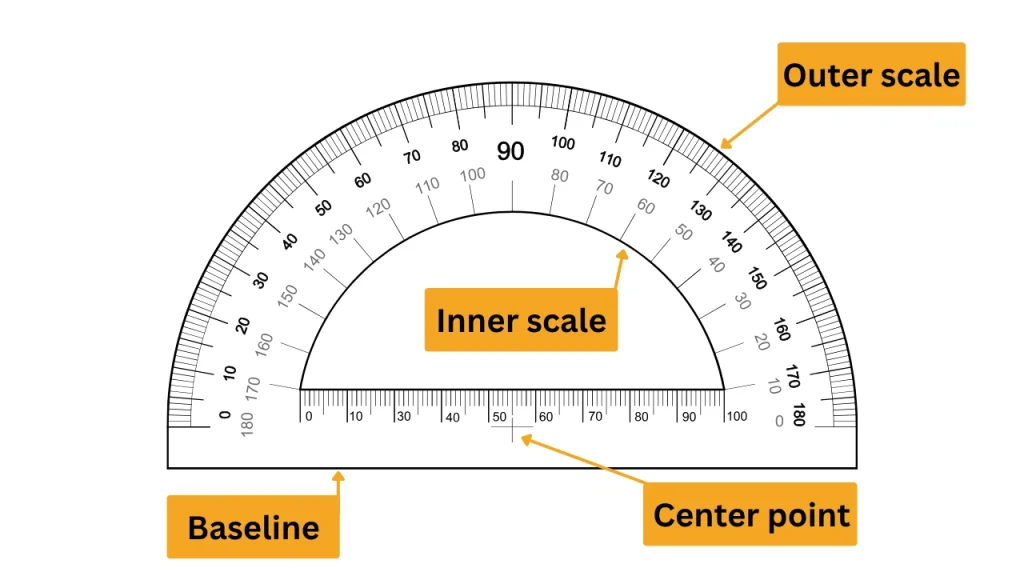
A protractor has four parts you need to know before you read it. Match each one on the image below.
- Baseline: The straight bottom edge, which lines up with one arm.
- Center point: The small mark at the midpoint of the baseline, placed on the vertex.
- Inner scale: One row of numbers along the curved edge, the arc.
- Outer scale: The second row, which runs in the opposite direction.
How to Read a Protractor (Inner and Outer Scale)
How to read a protractor comes down to one rule: use the scale that starts at 0 on your baseline. Learning how to read protractor scales takes four steps, and a reading a protractor anchor chart in class follows the same logic.
- Find the baseline: It is the straight bottom edge.
- Pick the scale: Use the scale where the first arm points to 0.
- Follow that scale: If the ray crosses 70 on the scale that starts at 0 on your baseline, the angle is 70 degrees.
- Check the size: If the angle looks smaller than a square corner, your answer should be under 90.
Common mistake: reading the wrong scale. If a small angle reads 110, you used the other scale. Subtract from 180 to check: 180 minus 110 is 70.
How to Measure Angles with a Protractor (Step by Step)
Measuring angles with a protractor takes five steps, and the same steps answer how do you measure angles using a protractor on paper or on screen.
- Put the center point on the vertex: The vertex is where the two arms meet.
- Line the baseline up with one arm: The arm should run along the baseline.
- Find the 0 on the correct scale: Use the scale where that arm points to 0.
- Read where the other arm crosses: Extend a short arm with a ruler.
- Write the value with the degree sign: For example, 65°.
A protractor works by reading the turn between two arms. That is how a protractor is used: it shows how far one arm has rotated from the other. If you ask how do you use a protractor, how do I use a protractor or how to work a protractor you have never held, the answer is the same: line it up, then read the scale. Protractor work gets easier after a few tries.
Here is how to use a protractor to measure angles in class, and how to use protractor to measure angles in a drawing: center, align, read. That also answers how do you use a protractor to measure an angle and how do I use a protractor to measure an angle. The method is the same for how do I use a protractor to measure angles of any size.
Learning how to use a protractor to measure an angle starts with a known angle. Press the 90 button above and check that the arms form a square corner. Anyone asking how do you measure with a protractor, how to measure with a protractor or how to measure using a protractor can practice this way. It also covers how to use a protractor for measuring angles, how to measure angle using protractor, how to measure angles with a protractor, how to measure an angle with a protractor and how to use protractor in angles.
How to Measure a Reflex Angle with a Protractor
A reflex angle is more than 180 degrees, so a semicircle cannot read it directly. This is how to measure reflex angles with protractor tools: measure the smaller angle on the other side, then subtract it from 360. On this page, you can also switch to the 360 range.
reflex angle = 360 degrees minus the measured angle
For example, if the smaller angle is 110 degrees, the reflex angle is 250 degrees.
How do you measure an angle without a protractor?
Use one of three methods. Measuring angles without a protractor is possible, and if you ask how do I measure an angle without a protractor, start with the easiest one.
- Use this online protractor on screen: Drag the handle and read the angle.
- Fold paper: Folding a square corner in half gives 45 degrees, and in half again gives 22.5 degrees.
- Use a ruler and a right triangle: Measure the opposite and adjacent sides, then tan of the angle = opposite side divided by adjacent side. Use the inverse tangent on a calculator.
These cover how to measure an angle without a protractor, and how to measure angles without a protractor on a worksheet.
Protractor vs Compass
Protractor vs compass is a question of job. A protractor measures and marks angles, while a compass draws circles and arcs and can carry a length from one place to another. Compass or protractor? Pick by the task.
| Tool | What it does | Typical use |
|---|---|---|
| Protractor | Measures and marks angles | Checking or drawing an angle |
| Compass | Draws circles and arcs, carries lengths | Drawing circles, arcs and equal lengths |
A protractor and compass are often used together, and a geometry box usually includes a compass and protractor in one protractor and compass set. Shops and teachers may call it a compass and protractor set, a compass protractor set or a protractor compass set. People also search compass & protractor, compass protractor, protractor compass or compass with protractor for the same pair of tools. Compass vs protractor is rarely a real choice, since many drawings need both.
Who Uses an Online Protractor?
- Students and teachers: Check homework, show angle types in class and explain a protractor for geometry lessons.
- Designers: Test rotations and angles in layouts and sketches.
- Woodworking and DIY: Plan miter angles before cutting, a quick step in protractor for woodworking.
- Engineers and technicians: Make rough angle checks while reading drawings.
An angle read on a screen is a visual estimate. Any cut, fit or safety-related job should be checked with a physical tool, such as a woodworking protractor or a bevel gauge.
Frequently Asked Questions
Q1: Can I check angles online?
Ans: Can I check angles online?
Q2: Is there a virtual protractor?
Ans: Yes, this page is one. It is a virtual protractor that runs in your browser, so you can set and read angles on screen without installing anything.
Q3: Can I use my phone as a protractor?
Ans: Yes. Open this page in your phone browser and drag the handles with your finger. It shows an on-screen angle, so it does not measure real objects.
Q4: What unit of measurement does a protractor use?
Ans: A protractor uses degrees, shown as °. A full turn is 360 degrees. This tool can also show radians and gradians if you need them.
Q5: Where can I find a protractor?
Ans: Stationery shops, school suppliers and online stores sell protractors, and most geometry boxes include one. For a quick check, you can use this online protractor instead.
Q6: How do you measure angles with a protractor?
Ans: Place the center point on the vertex, line the baseline up with one arm, then read where the other arm crosses the scale that starts at 0.